Website Refresh: 11 Common Challenges (And How to Actually Fix Them)

TL;DR Summary
Website Refresh
- A website refresh updates your existing site: new content, improved structure, better performance, etc. without starting from scratch
- Outdated content, broken links, inconsistent branding, and weak calls to action are the most common things that quietly hurt results
- Mobile performance, image optimization, and redirect management are easy to overlook but have real impact on user experience
- Accessibility and analytics often get skipped during a refresh. Both are worth building into your process
- You don’t have to fix everything at once. Prioritize by what most affects your visitors’ experience and work from there
This post may contain affiliate links, which means I may receive a commission, at no extra cost to you, if you make a purchase through a link. Please see my full affiliate disclosure for further information.
A Website Refresh Is More Involved Than It Sounds
A website refresh sounds like it should feel refreshing. Tidy up some pages, swap a few photos, update the copy. And then you open it up and discover that the service page hasn’t been touched in two years, several links go nowhere, the mobile version is a mess, and your branding looks like two different businesses made out in the middle of your homepage.
Most people doing a refresh, whether they’re working through it themselves or preparing to hand it off, hit the same wall: you open one thing and find three more things underneath it. The can of worms is very real.
The good news is that most of these challenges have straightforward fixes. This post walks through 11 of the most common ones, with practical solutions and the specific tools that help.
At the end, if you decide you’d rather hand the to-do list to someone else, I’ll share how we can work together on that, too.
Content and Accuracy
1. Outdated pages, stale bios, and expired offers
Outdated website content is one of the most trust-eroding things on a website, and it’s easy to miss when you’ve been staring at your own site for months. A bio that describes who you were two years ago, a service that you stopped offering, a promotion that ended. All of these subtly signal to visitors that no one is minding the store.
Start with your highest-traffic pages: homepage, about, and services. Then work through anything time-sensitive: seasonal offers, events, pricing that may have changed. A quick audit of the main pages usually surfaces the biggest issues fast.
Related: my website audit blog post covers how to do a full systematic review of your website content.
2. Broken links you haven’t noticed
Nothing makes a site feel abandoned faster than clicking a button that leads nowhere. Broken links are frustrating for visitors and they affect your SEO, too, since search engines use them as a signal about overall site health.
The free Ahrefs Broken Link Checker scans your site without requiring a login and takes a few minutes. Make it a quarterly habit rather than a one-time fix, since links break over time as external sites change or you update your own structure.

Structure, Navigation, and Branding
3. Navigation that’s becoming a junk drawer
Over time, websites accumulate pages. A menu that started as five clear options can slowly become a maze of dropdowns, old offer pages, and internal links that made sense at the time but no longer reflect how visitors think about your business.
Your navigation should help people move through your site with ease, not make them work to find what they’re looking for. During a refresh, it helps to step back and ask: if someone landed here for the first time, would they know where to go? Ruthless simplicity usually serves visitors better than comprehensiveness.
My Website Navigation Success Toolkit helps you straighten out your navigation and overall website visitor experience:

4. Branding that looks like two different businesses
A website refresh is often triggered by a bigger shift (a rebrand, a new niche, new offers) and that means your site may be mixing your old visual direction with your new one. Different font pairs on different pages, old brand colors in some sections, a photo style that no longer matches your current positioning. Visitors may not be able to name what feels off, but they feel it.
Go through your fonts, colors, button styles, photo choices, and copy tone. If it reads like a collaboration between two different brands, it probably is.
Wondering what should come first between the brand refresh or the website update? This branding post covers what to sort out first.


If you need a visual starting point for updated branding, Davey and Krista’s Canva Brand Kits are thoughtfully designed and easy to customize without starting from a blank canvas.
5. A site that looks broken on mobile devices
Just because your website looks good on a laptop doesn’t mean it holds up on a phone. Text that’s too small to read, images that stretch or disappear, buttons that are impossible to tap. These are all common, and they matter because traffic from mobile devices often accounts for more than half of all site visits.
The free Bing Mobile Friendliness Test gives you a quick read on how your site performs across devices. Check this on a real phone too, not just a browser window made smaller. The experience can be quite different.
“I can’t recommend Liz highly enough if you’re looking for an expert to help you rejuvenate or design your website! My old website’s design hadn’t been touched in more than a decade, so believe me when I say it was long overdue for some TLC. So, I jumped at the chance to take advantage of Liz’s Website Rejuvenation Day service.
Liz manages to perfect the blend of professionalism and personalization in how she applies her expertise for her clients. The whole process was so well organized, and it all went so smoothly. This was a huge relief for me, because my tech skills are minimal, and I was dreading having to do a lot of behind-the-scenes admin for the day. But I didn’t need to — we had a call before the Rejuvenation Day and Liz laid out all the steps and gave me a To Do list. This made it super easy for me to know what I needed to provide her with.
Liz kept in touch regularly throughout the day itself, and it was so exciting to see my beautifully rejuvenated website emerge within hours. I absolutely love it. And she has put together a bunch of How To videos for me, to guide me with some of the key things I’ll need to do on the admin side.
Liz is quite simply a website wizard — I feel like she transformed my website from analog to digital! It’s great to be back in the current century! Liz is really awesome — you should jump at the chance to let her work some magic on your website.”

Conversions and User Experience
6. Calls-to-action that don’t actually ask for anything
If your site doesn’t tell visitors what to do next, most of them will default to doing nothing, not because they weren’t interested, but because the path wasn’t clear. Weak calls to action are one of the most common conversion rate problems on service provider sites.
A good CTA doesn’t push; it guides. It answers the question the visitor is already asking: what’s my next step here? Think beyond generic buttons like ‘Learn More’ or ‘Subscribe’ and get specific about what you’re actually inviting people to do.
Sage Grayson’s free workshop Never Leave ‘Em Hanging covers 20 practical call-to-action ideas with common mistakes to avoid. Worth bookmarking for any page you’re rewriting.

What Your Website Needs Right Now
7. Images that slow your site down
Large, unoptimized images are one of the top reasons websites feel slow or clunky, and they’re one of the easiest things to fix. Before uploading anything, compress it. Imagify is free for around 200 images a month and works on any platform.
If you’re on WordPress, ShortPixel automatically optimizes images after upload and can bulk-process your existing media library. The free tier covers a meaningful number of images per month and the paid plans are very affordable.
If your WordPress media library has become genuinely chaotic (duplicate files, inconsistent naming, images uploaded multiple times). Media 101 with WordPress from Michelle Lee walks you through organizing it properly and keeping it that way.
8. Accessibility left for later
Accessibility tends to slide to the bottom of the to-do list during a refresh because it feels large and compliance-heavy. The reality is that most meaningful accessibility improvements are small, practical, and genuinely improve the experience for everyone, not just visitors with disabilities.
Approaching Accessibility Answered from Ami Hook-Ireland is a 3-step framework built specifically for business owners who want a real-world starting point. Plain-English guidance, workbooks in Google Docs, and no legal jargon. It’s designed for people running online businesses with limited time and energy, not teams with dedicated accessibility budgets.

Technical and Strategic Back End
9. Analytics that aren’t set up or aren’t being used
A refresh is the perfect time to check that your analytics are working, and that you actually know how to read them. You can’t improve what you can’t measure, and too many business owners discover mid-refresh that their tracking was broken or never set up properly.
Two options I use and recommend:
- Independent Analytics: A free WordPress plugin that gives you clean, simple traffic data without a Google account or data sharing. Good if you want basic stats without the complexity of Google Analytics 4.
- Fathom Analytics: A privacy-focused paid analytics tool that’s genuinely easy to understand, works across any platform, and doesn’t use cookies. My affiliate link includes $10 off your first invoice after a free trial period.
Either way, make sure you’re actually looking at which pages people visit most, where they come from, and whether they’re taking action before you finalize your refresh decisions.
10. SEO basics that got skipped
You don’t need to become an SEO expert during a refresh, but a few basics make a real difference: page titles that reflect what visitors actually search for, meta descriptions that summarize each page accurately, heading structures that make sense (H1, then H2, then H3, in order), and internal links that connect related content.
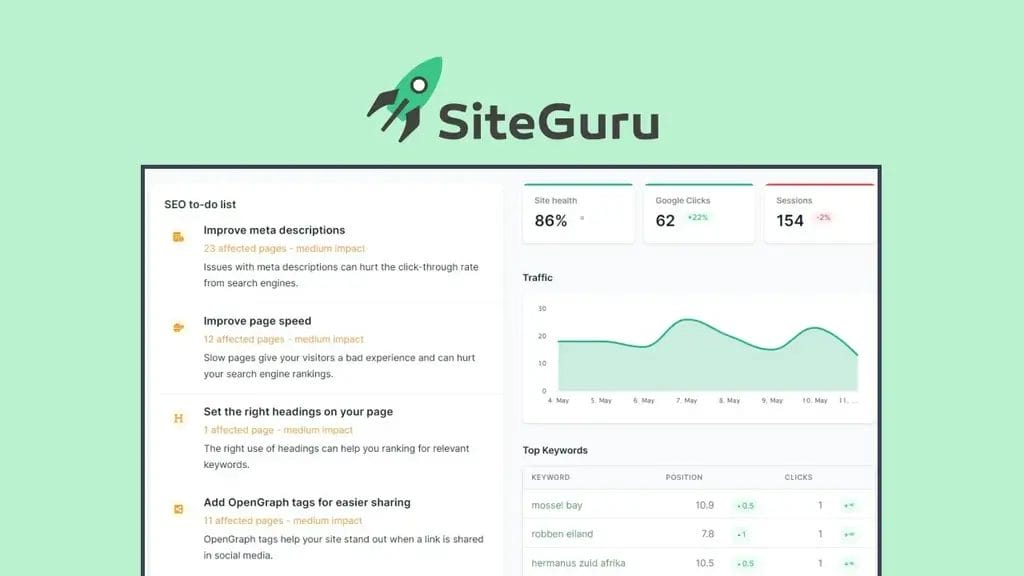
SiteGuru works across any website platform and generates a prioritized to-do list rather than a wall of technical jargon. It sends you a regular audit report by email so you can work through improvements over time rather than trying to tackle everything at once.
11. Redirects: the thing people forget until it’s too late
If your website refresh involves removing pages, changing URLs, or retiring old offers, every single changed URL needs a redirect pointing to the new location. Without redirects, anyone who bookmarked the old page, or any other site that linked to it, hits a dead end. It also means you lose any SEO value those URLs had built up.
Before making any structural changes, keep a list of your existing URLs so you know what needs redirecting afterward. It takes five minutes of prep work and saves real headaches later.
I used WP 301 Redirects when I refreshed my own site and retired some older pages and offers. It handled the redirect management cleanly and protected the SEO I’d built.
A Word of Advice
Trying to fix everything at once is a fast track to stalling out entirely. Most website refresh projects don’t fail because they’re too hard. They fizzle because the to-do list feels endless and nothing ever feels quite finished.
The most effective approach is to pick the five or six things that most affect your visitors’ experience and start there. Navigation, CTAs, mobile view, and outdated content move the needle faster than most other changes. Design refinements and technical cleanup can follow.
A practical order of operations:
- Fix anything that breaks the user journey first (broken links, non-working forms, mobile issues).
- Then address messaging and CTAs on your highest-traffic pages.
- Then trust signals (testimonials, credentials, legal pages).
- Then search engine optimization and technical cleanup.
- Then web design refinements and visual changes.
This order reflects impact on whether visitors take action, not visual priority.
Rather hand this list to someone else?
A Website Rejuvenation Day is a focused, one-day implementation service. We start with a strategy call to identify what will make the biggest difference for your specific site, and then I implement those updates, all in one day. It’s a refresh that actually gets done, without dragging on for weeks.
Frequently Asked Questions
What’s the difference between a website refresh and a full redesign?
A website refresh updates what you already have—new website content, improved structure, better performance, visual consistency—without starting from scratch. A website redesign usually means a new platform, new structure, or a major rebranding that requires rebuilding rather than updating. If your site’s foundation is solid but things feel outdated or misaligned with where your business is now, a refresh is almost always the faster and more economical move.
How do I know if I need a refresh or just a few updates?
If you’re making scattered updates here and there without a clear sense of what the biggest issues are, a refresh gives you a more structured approach. Good signals that a refresh is worth it: your content no longer reflects your current services, your branding has evolved but your site hasn’t kept up, visitors aren’t taking action despite decent traffic, or you find yourself hesitating to share your website link. My website audit post covers how to diagnose what specifically needs attention.
How much does a website refresh cost?
It depends on the scope and whether you’re doing the work yourself or hiring a professional. A DIY refresh costs primarily your time plus any tools or resources you invest in along the way. Professionally, a Website Rejuvenation Day is a focused, done-for-you option that delivers meaningful updates in a single day. Clients consistently find it a high-ROI investment—not just because of what gets done, but because it actually gets done, rather than sitting half-finished for months.
How long does a website refresh take?
It depends on the scope of what needs updating and how much time you can dedicate to it. A focused DIY refresh working through one category at a time (content, navigation, images, technical) can be done over a few weeks at a pace of a few hours per week. If you want it handled professionally in a single focused session, a Website Rejuvenation Day covers the highest-priority updates in one day.
What should I do before starting a website refresh?
A few things worth doing first: back up your site, note your current top-performing URLs (so you know what needs redirecting if you change anything structural), and take screenshots of your current pages so you have a before to compare against. If you’re not sure where to focus, running through the Intentional Website Checklist gives you a starting inventory of what needs attention.
Is a website refresh worth it if I’m planning to redesign later anyway?
Usually yes, unless a full rebuild is genuinely imminent. A refresh keeps your current site functional and professional in the meantime, and the content and structural work you do during a refresh often carries directly into a redesign project. Clients who come to a redesign with a recently refreshed site (current content, clean navigation, working links) make faster progress than those who need to rebuild and update everything at the same time.
Do I need to fix all 11 issues before my refresh is complete?
Nope. Prioritize what affects your visitors’ user experience most. Navigation, mobile view, and calls to action are a great place to start. If you’d like a professional opinion on what deserves the most attention on your specific site, a Website Wellness Review gives you a personalized audit with a prioritized action plan.